SYSTEM // ACTIVE v3.2 / 2026
CASE 03 // EXPERIENCE MANAGER
Sub-page · Experience Manager · The operational backbone

From zero to a live, ticketed experience. In four steps.

Experience Manager is the surface operators use every day: creating experiences, managing bookings, handling walk-ups, and capturing first-party data from every guest on every booking. It powers over 13,000 experiences and reaches 1.3M users a year. This sub-page is the deep dive on how it was designed to do that.

Yearly experiences
13,000+
Experiences published across spirits, CPG, retail, and entertainment brands.
Yearly users
1.3M+
Guests reached through the operator-facing platform and guest checkout.
Ticket sales lift
+20%
Lift attributed to the redesigned booking and experience creation flow.
Role
Director
Director of Design, owning Experience Manager end to end across platform.
Experience Manager · Surface 01 · Create

The creation wizard: everything needed to publish in four steps.

— 01 Experience Creation

Designed for the brand ambassador who is also pouring the bourbon.

The person creating a ticketed whisky tasting at a distillery isn't a product manager. They're the brand ambassador who's also running the tour, answering guest questions, and setting up the tasting table. The creation flow had to get from nothing to fully published, with tickets, capacity, scheduling, and media, without a training session.

Four required steps cover everything an operator needs to go live: About (name, description, category, and optional translations), Tickets (types, pricing, add-ons, and payment rules), Scheduling (time slots, capacity, and booking preferences), and Media (the cover photo that gates publishing). Advanced settings (Resources, Checkout Questions, Online Booking Preferences, and Email Customizations) are present but out of the critical path. An operator can be live in minutes, or spend an hour on the details. The flow handles both.
  • About
    Name, subtitle, category, description, translations. The experience name propagates throughout Dashboard, Guest Checkout, booking emails, and Atlas. An optional internal nickname lets staff differentiate similarly-named experiences without changing what guests see. Translations are first-class: every language enabled on the account appears inline, and the source text is visible above the translated field.
  • Tickets
    Ticket types, pricing, capacity, add-ons. Tickets support Per Unit and Per Experience pricing, VAT configuration, internal-only types, and up to 500 add-on units per booking. A booking cutoff time per add-on, originally built for Diageo whose add-ons require longer lead time, lets brands limit add-on availability without limiting experience bookings.
  • Scheduling
    Time slots, availability, booking preferences. A schedule creates time slots up to 365 days ahead the night they're needed. Staff can also create bookings outside a schedule (ad-hoc), generating a time slot on the fly. Booking preferences gate how far in advance guests can book, set minimum and maximum capacity, and control whether slots are publicly visible or staff-only.
  • Media
    Photos and optional video embed. At least one cover photo is required to publish. The cover appears throughout Guest Checkout, Dashboard, Front Desk, and AnyRoad Live. Additional photos form the image carousel on Experience Details. YouTube or Vimeo embeds can optionally autoplay as the featured cover.
  • Advanced
    Resources, Checkout Questions, Online Booking Preferences, Email Customizations. Optional settings that deepen the experience without blocking publishing. Resource assignment, question library integration, and white-label email copy all live here. Templates let staff pre-configure Admin-level settings so operators can create new experiences without contacting the AnyRoad team.
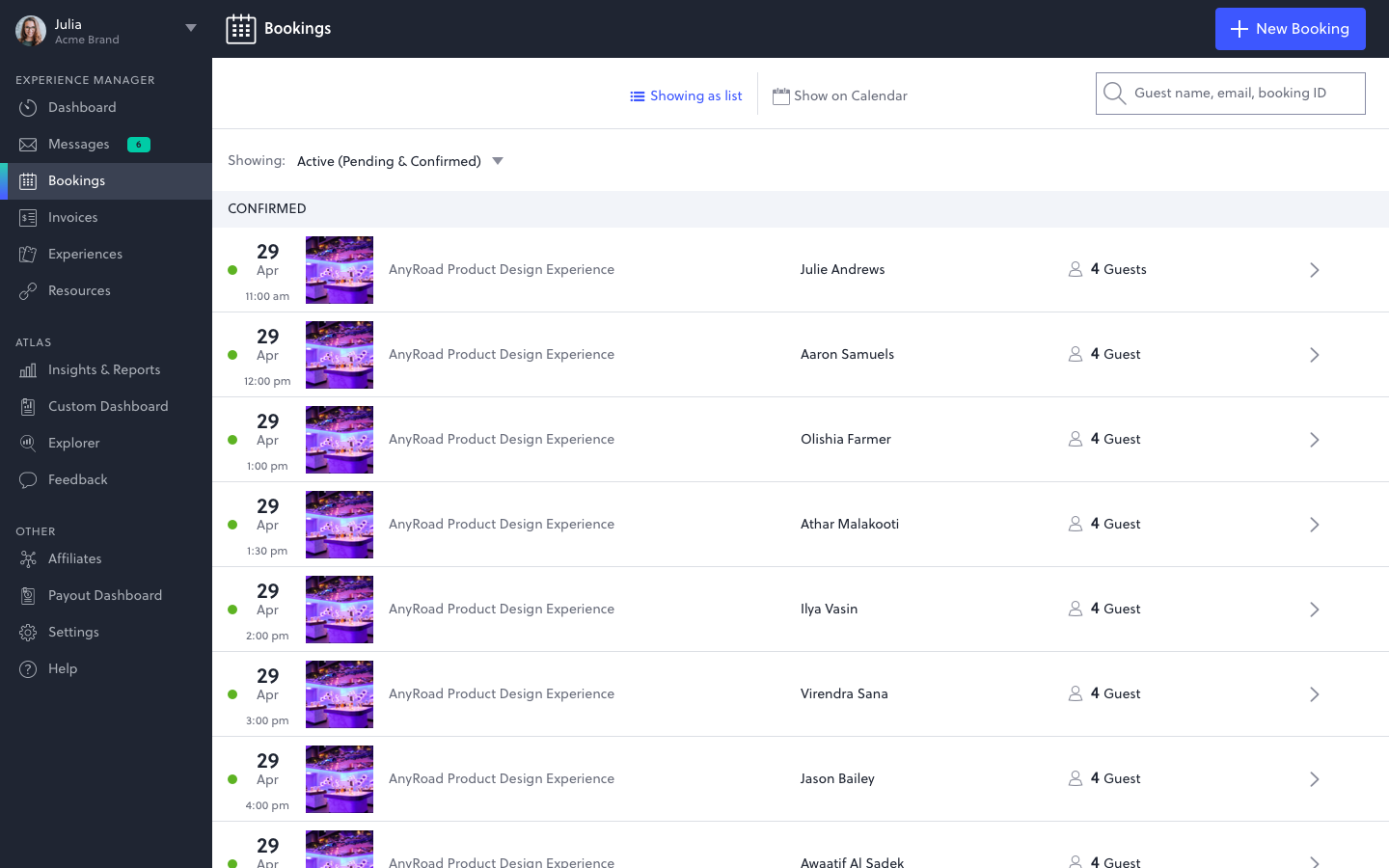
Experience Manager bookings list with side navigation showing Dashboard, Bookings, Invoices, Experiences, Resources, and Atlas surfaces
— Experience Manager · Bookings list, desktop
— Interactive prototype · Create Experience · Setup wizard → About → Tickets → Scheduling → Images
Experience Manager · Surface 02 · Manage

Booking management: the operator's daily instrument.

— Interactive prototype · Booking Management · List → Slot view → Booking detail
— 02 Booking Management

Three questions. Every layout answers one of them.

Most operators use the bookings surface to do one of three things: check who's confirmed for a given date, track down a guest who can't find their booking, or sort out something that went wrong with payment. The list view and detail view are designed around those jobs.

Underneath, a booking moves through many states between initiated and complete, each with different side effects and available actions. The interface doesn't expose that. It shows one readable status at each moment and surfaces only the controls that apply to it. A booking that needs attention looks different from one that doesn't.

  • 01
    Booking list as the daily instrument. Filterable by status, experience, date, and guest. The right status is visible before the operator clicks in, so they don't have to open individual bookings to find out what needs attention.
  • 02
    Controls that match the current state. A confirmed booking shows Edit, Send Message, and Cancel. A pending booking shows Accept and Reject. The available actions change with the booking's status; the layout stays consistent.
  • 03
    Payment clarity without payment complexity. Authorization holds, manual payment requests, and partial payment states each appear as a readable status. Payment Requests let staff send a secure payment link to an unpaid booking after the fact, without voiding and recharging.
  • 04
    Booking Requests for manual approval flows. Some experiences require operator review before confirming. Guests complete checkout normally, receive a pending confirmation page, and the operator works through a Pending queue to accept or reject. A 7-day card hold covers the window.
Experience Manager · Surface 03 · Operate

Walk-up booking: resolved on the spot.

— 03 Walk-up & Front Desk

The time slot that doesn't exist yet isn't a blocker.

A guest arrives at the distillery without a reservation. There's no published time slot in the next hour. A group of eight shows up to the bourbon tour but they want the brandy tour instead. These are real operational moments that happen every day at hundreds of venues, and they used to mean improvising: taking payment offline, manually updating records later, or turning guests away.

Walk-up booking creates a time slot on the fly and attaches a booking to it in a single flow. Transfer to a new experience auto-maps ticket types and reconciles the price difference on the original card. The entire flow runs on a phone, so whoever is closest to the guest can resolve it on the spot.

  • 01
    Ad-hoc slot creation. Staff unchecks "Limit selection to scheduled dates" and picks any date and time. The system creates both a time slot and a booking simultaneously. The slot appears on the calendar and in Atlas data like any scheduled slot.
  • 02
    Experience transfer with auto ticket-mapping. When a guest wants a different experience, the transfer flow matches ticket types across experiences by capacity and price, maps them automatically where possible, and surfaces manual resolution where types don't align.
  • 03
    Price reconciliation on the original card. If the new experience costs more or less, the difference is applied to the card on file. Staff doesn't need to run a new charge manually.
  • 04
    Mobile-first operator UI. Front Desk and Add a Booking are both designed to run on a phone. The tap targets, flow length, and action hierarchy are calibrated to a staff member who is also doing three other things.
— Interactive prototype · Add a Booking · Scheduled slots → Ad-hoc slot creation
— Interactive prototype · Change Experience · Ticket mapping → Price reconciliation
Experience Manager · Surface 04 · Capture

FullView: first-party data from every guest, not just the booker.

— Interactive prototype · FullView · Operator configuration · Collection mode, limits, and ticket exclusions
— Interactive prototype · FullView · Checkout → Booking confirmation → Guest sharing link → Submission
— 04 FullView

A booking for four guests shouldn't mean data for one.

Before FullView, a booking submitted by John Smith with three additional guests gave the operator exactly one guest record: John's. The other three walked in for the whisky tasting as strangers. When they submitted post-visit NPS feedback, that feedback couldn't be tied to a named guest profile, a ticket type, or a segment. The attribution chain broke at the front door.

FullView captures checkout questions, feedback, and marketing opt-ins from every guest on a booking, not just the booker. The booking guest collects additional guest names during checkout; a sharing link then reaches those guests with the same questions they would have seen if they'd booked directly. The data lands in Atlas, attributed to the right guest, and feeds Explorer segments and Pinpoint analysis. It's the capability AnyRoad's competitors don't have, and the one that makes the analytics layer meaningful at scale.

  • 01
    Two collection modes. Guest Names Only collects additional names from the booking guest during checkout. Guest Names and Contact Info goes further: after checkout, a sharing link prompts additional guests to submit their own information. Configurable per account.
  • 02
    Same questions, every guest. Additional guests see the same checkout questions and post-visit feedback as the booking guest. The answers land in the same Atlas data model, attributed per person, not per booking.
  • 03
    Minor configuration for regulated contexts. Ticket types can be configured as Minors at the account level, excluding those guests from data collection. Built for spirits brands running age-restricted experiences where collecting minor data raises compliance flags.
  • 04
    Large-group cutoff. FullView can be disabled above a configurable group size — a practical concession for corporate buyouts and large-group bookings where chasing 40 individual completions creates more friction than data.
  • 05
    IP-based location capture. Additional guests' locations are automatically inferred from their IP address when they complete the sharing link. No field required; the data lands in Guest Distances and Demographics in Atlas.
Cross-surface system thinking

What made four surfaces feel like one instrument.

The operator's day as the unit of design.

Experience Manager isn't a content management tool bolted to a booking engine. The surfaces compose: a question configured in the creation wizard populates Atlas the moment a guest responds. A booking reschedule updates Atlas capacity without a manual sync. A FullView completion from an additional guest attributes directly to the segment an Explorer query returns. The chain is legible end to end.

The principle that held it together was designing against the operator's day, not the feature list. A distillery brand ambassador creates a new experience in the morning, manages walk-up bookings in the afternoon, and reviews guest completions that night. Experience Manager follows that arc (create, operate, capture) as a single instrument, not four tools.

  • — Principle 01 / State-driven, not mode-driven Every action available to an operator surfaces based on a booking's current state. Nothing is hidden in a settings panel. Nothing requires knowing what state the booking is in to find the right action. The machine knows; the UI shows.
  • — Principle 02 / Advanced without being in the way Resources, Checkout Questions, Online Booking Preferences, and Email Customizations are real capabilities used by sophisticated operators. They live in the creation flow where they belong, but can't block a simpler operator from going live. The floor is low; the ceiling is high.
  • — Principle 03 / First-party data by default Every booking captures the booker's data. FullView extends capture to every seat. The design choice was to make the extended capture feel like a natural continuation of checkout, not an additional form. More data without more friction.
  • — Principle 04 / Mobile as a first-class context Walk-up booking, check-in, and booking management all run on a phone in the field. Desktop is where experiences are created; mobile is where they're operated. The interaction design of the two contexts is different by intention. Right tool, right moment.
Create
— 01 / Experience Creation
Manage
— 02 / Booking Lifecycle
Operate
— 03 / Walk-up & Front Desk
Capture
— 04 / FullView
— Shared spine
Booking · Guest · Experience data model
Outcomes

What the platform moves at this scale.

Yearly experiences
13,000+
Experiences published through the creation flow across hundreds of operator accounts.
Yearly users
1.3M+
Guests reached across all experience types, every one of them flowing through the 13-state booking machine.
Ticket sales lift
+20%
Lift in ticket sales attributed to redesigned booking and creation flows.
FullView reach
First-party
A capability competitors don't have: opt-ins and responses from every guest on every booking, not just the booker.

— Platform-wide numbers via AnyRoad · Full context on parent case

Reflection

What this taught me about designing operational infrastructure.

The hardest design problem was representing complexity the operator doesn't need to see.

A 13-state booking machine has to work correctly in engineering and invisibly in the interface. The design work wasn't exposing the states; it was deciding which states the operator ever needs to name. The answer was three: confirmed, pending, and something's wrong. Everything else is an implementation detail that the platform handles, and the interface acknowledges through available actions, not visible labels.

Every concession to power users costs a simpler user something.

Advanced Settings in the creation wizard exists because sophisticated operators need Resources, conditional Checkout Questions, and per-channel Email Customizations. But surfacing those in the critical path would have turned a four-step flow into a twenty-step one for the brand ambassador who just needs to go live. The tension between power and simplicity is never resolved; it's managed, one flow decision at a time.

FullView was a data architecture decision that had to be designed as a UX decision.

The value of FullView is that it extends first-party data capture to every seat on a booking. But that value only lands if additional guests actually complete the sharing link. The design of that link (what it asks, how it's framed, when it arrives) determines whether the data model is full or empty. Platform design and product design were the same problem.